

ATM90E32 Power Sensor
The atm90e32 sensor platform allows you to use your ATM90E32 voltage/current and power sensors
(datasheet) with
ESPHome. This sensor is commonly found in CircuitSetup 2 and 6 channel energy meters and the Gelidus Research 2 channel power meter.
Communication with the device is done via an SPI bus, so you need to have an spi: entry in your configuration
with both mosi_pin and miso_pin set.
The ATM90E32 IC can measure up to three AC voltages although typically only one voltage measurement would be used for the mains electricity phase of a household. Three current measurements are read via CT clamps.
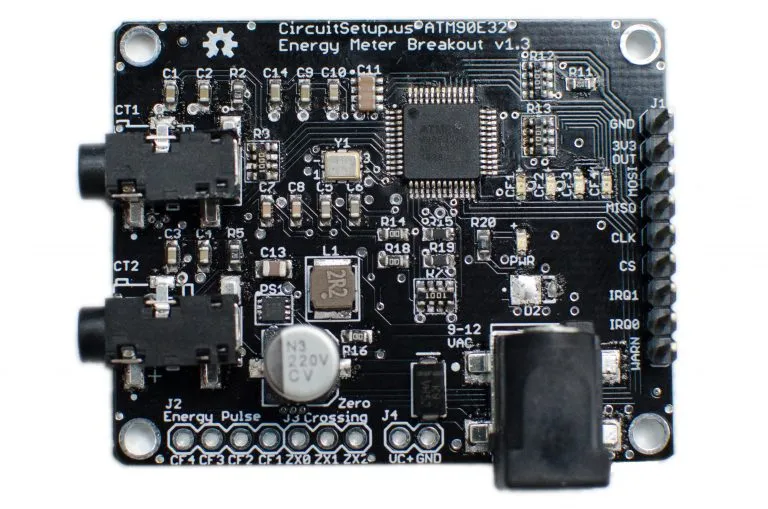
The CircuitSetup Split Single Phase Energy Meter can read 2 current channels and 1 (expandable to 2) voltage channel.
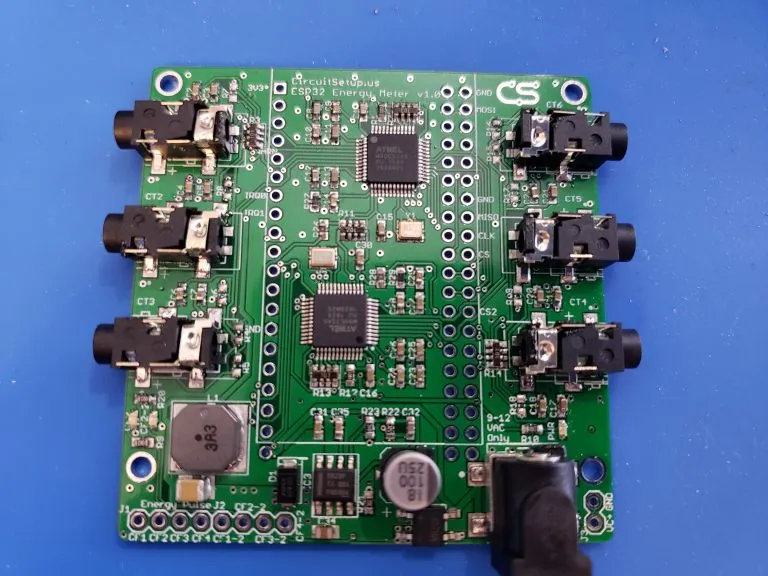
The CircuitSetup 6-Channel Energy Meter can read 6 current channels and 2 voltage channels at a time, this board has two ATM90E32 ICs and requires two sensors to be configured in ESPHome.
Configuration variables
Section titled “Configuration variables”-
cs_pin (Required, Pin Schema): The pin CS is connected to. For the 6 channel meter main board, this will always be 5 and 4. For the add-on boards a jumper can be selected for each CS pin, but default to 0 and 16.
-
line_frequency (Required, string): The AC line frequency of the supply voltage. One of
50Hz,60Hz. -
id (Optional, ID): Required if using more than one
atm90e32chip with buttons for calibration, reference voltage/current fields, and phase status fields -
phase_a (Optional): The configuration options for the 1st phase.
-
voltage (Optional): Use the voltage value of this phase in volts (RMS). All options from Sensor.
-
current (Optional): Use the current value of this phase in amperes. All options from Sensor.
-
power (Optional): Use the power value on this phase in watts. All options from Sensor.
-
reactive_power (Optional): Use the reactive power value on this phase in VAR. All options from Sensor.
-
apparent_power (Optional): Use the apparent power value on this phase in VA. All options from Sensor.
-
power_factor (Optional): Use the power factor value on this phase. All options from Sensor.
-
phase_angle (Optional): Use the phase angle value on this phase in degrees. All options from Sensor.
-
peak_current (Optional): Use the peak current value on this phase in amperes. All options from Sensor.
-
harmonic_power (Optional): Use the harmonic power value on this phase. All options from Sensor.
-
gain_voltage (Optional, int): Voltage gain value to scale the low voltage AC transformer to household mains feed. Defaults to
7305. -
gain_ct (Optional, int): CT clamp calibration value for this phase. Defaults to
27961. -
offset_voltage (Optional, int): The voltage offset obtained using the offset calibration feature when current and voltage are 0 Defaults to
0 -
offset_current (Optional, int): The current offset obtained using the offset calibration feature when current and voltage are 0 Defaults to
0 -
offset_active_power (Optional, int): The active power offset obtained using the power offset calibration feature when current is 0 and a voltage transformer is plugged in and calibrated. Defaults to
0 -
offset_reactive_power (Optional, int): The reactive power offset obtained using the power offset calibration feature when current is 0 and a voltage transformer is plugged in and calibrated. Defaults to
0 -
forward_active_energy (Optional): Use the forward active energy value on this phase in watt-hours. All options from Sensor.
-
reverse_active_energy (Optional): Use the reverse active energy value on this phase in watt-hours. All options from Sensor.
-
-
phase_b (Optional): The configuration options for the 2nd phase. Same options as
phase_a. -
phase_c (Optional): The configuration options for the 3rd phase. Same options as
phase_a. -
frequency (Optional): Use the frequency value calculated by the meter. All options from Sensor.
-
peak_current_signed (Optional, boolean): Control the peak current output as signed or absolute. Defaults to
false. -
chip_temperature (Optional): Use the chip temperature value. All options from Sensor.
-
gain_pga (Optional, string): Increase this when the output of the CT clamp is too low and
gain_ctis maxed out. One of1X,2X,4X. Defaults to1X, which is suitable for most CT clamps. -
current_phases (Optional): The number of phases the meter has,
2or,3The 6 Channel Expandable Energy Meter should be set to3, and the Split Single Phase meter should be set to2. Defaults to3. -
update_interval (Optional, Time): The interval to check the sensor. Defaults to
60s. -
spi_id (Optional, ID): Manually specify the ID of the SPI Component if you want to use multiple SPI buses.
-
enable_gain_calibration (Optional, boolean): If true this enables gain calibration for voltage,
gain_voltage, and current,gain_ct, based on the values entered in the corresponding voltage,reference_voltage, and current,reference_current, reference fields. With multiple ATM90E32 sensors each one is enabled individually, and it’s buttons are mapped using an id value pair. e.g.id: chip1when more than one is defined. After running, the values are stored in chip memory and will be available upon reboot and OTA software updates. -
enable_offset_calibration (Optional, boolean): If true this enables fine grained offset noise 0 level calibration for voltage,
offset_voltage, and current sensors,offset_current, & power offset for active,offset_active_power, and reactive power,offset_reactive_power. Buttons are required to operate the calibration feature. With multiple ATM90E32 sensors each one is enabled individually, and it’s buttons are mapped using an id value pair. e.g.id: chip1when more than one is defined. After running, the values are stored in chip memory and will be available upson reboot and OTA software updates. Offset calibration can only be performed when all voltage and current inputs are at a 0 value. USB power is recommended. For power offset calibration, only a voltage transformer should be connected.
Text Sensor
Section titled “Text Sensor”text_sensor: - platform: atm90e32 id: chip1 phase_status: phase_a: name: "Phase A Status" phase_b: name: "Phase B Status" phase_c: name: "Phase C Status" freq_status: name: "Frequency Status"Configuration variables:
-
id (Optional, ID): The ID of the
atm90e32sensor defined above. Required if using more than one sensor. -
phase_status (Optional): Enables per-phase status conditions:
-
phase_a (Optional): Phase A status field. All options from Text Sensor.
Will Report:
-
Over current: Detected when current ≥ 65.53 A.
-
Over voltage / Voltage Sag: Based on the configured
line_frequency. For example:- At
60Hz(120V expected), sag = <78%, over = >122%. - At
50Hz(220V expected), sag = <78%, over = >122%.
- At
-
Phase Loss: Indicates if the phase has dropped out.
If no condition is met, the sensor reports
Okay.
-
-
phase_b (Optional): Phase B phase status field. Same options as Phase A
-
phase_c (Optional): Phase C phase status field. Same options as Phase A
-
-
frequency_status (Optional): Reports status based on frequency thresholds.
All options from Text Sensor.
-
For
50Hzsystems:LOWif frequency ≤ 47HzHIGHif frequency ≥ 53Hz
-
For
60Hzsystems:LOWif frequency ≤ 57HzHIGHif frequency ≥ 63Hz
If the frequency is within the expected range, the output will be
Normal. -
Button
Section titled “Button”button: - platform: atm90e32 id: chip1 run_gain_calibration: name: "Run Gain Calibration" clear_gain_calibration: name: "Clear Gain Calibration" run_offset_calibration: name: "Run Offset Calibration" clear_offset_calibration: name: "Clear Offset Calibration" run_power_offset_calibration: name: "Run Power Offset Calibration" clear_power_offset_calibration: name: "Clear Power Offset Calibration"Configuration variables:
-
id (Optional, ID): The ID of the
atm90e32sensor defined above. Required if using more than one sensor. -
run_gain_calibration (Optional): A button to run the gain calibration.
enable_gain_calibrationmust beTrue. These values can be permanently stored ingain_voltageandgain_ct. All options from Button. -
clear_gain_calibration (Optional): A button to clear the gain calibration from flash memory and use default values, or values defined under
gain_voltageandgain_ct. All options from Button. -
run_offset_calibration (Optional): A button to run the offset calibration.
enable_offset_calibrationmust beTrue. These values can be permanently stored inoffset_voltageandoffset_current. All options from Button. -
clear_offset_calibration (Optional): A button to clear the gain calibration from flash memory and use default values, or values defined under
offset_voltageandoffset_current. All options from Button. -
run_power_offset_calibration (Optional): A button to run the power offset calibration.
enable_offset_calibrationmust beTrue. These values can be permanently stored inoffset_active_powerandoffset_reactive_power. All options from Button. -
clear_power_offset_calibration (Optional): A button to clear the gain calibration from flash memory and use default values, or values defined under
offset_active_powerandoffset_reactive_power. All options from Button.
Number
Section titled “Number”number entities can be configured to provide calibration voltage & current reference values at runtime.
number: - platform: atm90e32 id: chip1 reference_voltage: phase_a: name: "Phase A Ref Voltage" phase_b: name: "Phase B Ref Voltage" phase_c: name: "Phase C Ref Voltage" reference_current: phase_a: name: "Phase A Ref Current" phase_b: name: "Phase B Ref Current" phase_c: name: "Phase C Ref Current"Configuration variables:
-
id (Optional, ID): The ID of the
atm90e32sensor defined above. Required if using more than one sensor. -
reference_voltage (Optional): Fine grained gain calibration of a known voltage that a voltage transformer is connected to. It is used to calculate the value for
gain_voltage. To be used in conjunction with therun_gain_calibrationbutton.enable_gain_calibrationmust beTrue. Each phase below defaults tomin_value: 100,max_value: 200,mode: box,optimistic: True,step: 0.1.-
phase_a (Optional): Phase A reference voltage field. All options from Number
-
phase_b (Optional): Phase B reference voltage field. If not specified, will use the value from
phase_a(CircuitSetup’s 6 channel meter has voltage phases tied together). All options from Number -
phase_c (Optional): Phase C reference voltage field. If not specified, will use the value from
phase_a(CircuitSetup’s 6 channel meter has voltage phases tied together). All options from Number
-
-
reference_current (Optional): Fine grained gain calibration for a known current of the circuit a CT is measuring. It is used to calculate the value for
gain_ct. To be used in conjunction with therun_gain_calibrationbutton.enable_gain_calibrationmust beTrue. Each phase below defaults tomin_value: 1,max_value: 200,mode: box,optimistic: True,step: 0.1.
Calibration
Section titled “Calibration”To achieve accurate voltage and current readings, it’s recommended to calibrate your voltage transformer and CT clamps. ESPHome supports automatic gain and offset calibration for ATM90E32-based meters.
To use these features, ensure:
enable_gain_calibrationand/orenable_offset_calibrationare set totrue.- The appropriate Calibration Buttons and Reference Fields are configured.
- You use reliable reference devices (Kill-A-Watt, multimeter, known load).
The default configuration is designed for:
- Current transformer: SCT-013-000
- Voltage transformer: Jameco Reliapro 9V AC
A load which uses a known amount of current can be used to calibrate. For a more accurate calibration use a Kill-A-Watt meter or a multimeter capable of measuring mains voltage.
Voltage
Section titled “Voltage”Use the expected mains voltage for your region, 110V/230V, use a reliable multimeter, or plug in a Kill-A-Watt and select voltage to obtain your true reference voltage. Input this value into the reference voltage field in Home Assistant’s device page for the meter.
When clicking on Run Gain Calibration, the software does the following calculation:
New gain_voltage = (your voltage reading / ESPHome voltage reading) * existing gain_voltage value
The new voltage gain value is saved to ESP flash memory and applied immediately. You can view the result in the ESPHome logs.
Copy the value into gain_voltage in your YAML config to persist it across reflashes (OTA updates do not erase flash memory).
Here are common voltage calibrations for the Split Single Energy Meter: For meter ≤ v1.3:
-
42080 - 9v AC Transformer - Jameco 112336
-
32428 - 12v AC Transformer - Jameco 167151 For meter > v1.4:
-
37106 - 9v AC Transformer - Jameco 157041
-
38302 - 9v AC Transformer - Jameco 112336
-
29462 - 12v AC Transformer - Jameco 167151 For Meters ≥ v1.4 rev.3
-
3920 - 9v AC Transformer - Jameco 157041
Here are common voltage calibrations for the Expandable 6 Channel Energy Meter: For meter ≤ v1.2:
-
42080 - 9v AC Transformer - Jameco 112336
-
32428 - 12v AC Transformer - Jameco 167151 For meter > v1.3:
-
7305 - 9v AC Transformer - Jameco 157041
Current
Section titled “Current”Hook up a current transformer around the hot wire of a known or measured load, like a space heater or hair dryer. Enter this value into the corresponding reference current field in Home Assistant’s device page for the meter. Any reference fields that are left blank will not be calculated.
When clicking on Run Gain Calibration, the software does the following calculation:
New gain_ct = (your current reading / ESPHome current reading) * existing gain_ct value
The new current gain value is saved to ESP flash memory and applied immediately. You can view the result in the ESPHome logs.
Copy the value into gain_ct in your YAML config to persist it across reflashes (OTA updates do not erase flash memory).
It is possible that the two identical CT current sensors will have different
gain_ct numbers due to variances in manufacturing, although it will be
small. The current calibration can be done once and used on all sensors or
repeated for each one.
Here are common current calibration values for the Split Single Phase Energy Meter when gain_pga is set to 4X :
- 200A/100mA SCT-024: 12597
Here are common current calibration values for the Split Single Phase Energy Meter when gain_pga is set to 2X :
- 20A/25mA SCT-006: 10170
- 100A/50mA SCT-013-000: 25498
- 120A/40mA SCT-016: 39473
- Magnalab 100A: 46539
Here are common current calibrations for the Expandable 6 Channel Energy Meter when gain_pga is set to 1X :
- 20A/25mA SCT-006: 11131
- 30A/1V SCT-013-030: 8650
- 50A/1V SCT-013-050: 15420
- 80A/26.6mA SCT-010: 41996 (note this will saturate at 2^16/10^3 amps)
- 100A/50ma SCT-013-000: 27961
- 120A/40mA: SCT-016: 41880
- 200A/100mA SCT-024: 27518
- 200A/50mA SCT-024: 55036
Active Energy
Section titled “Active Energy”The ATM90E32 chip has a high-precision built-in ability to count the amount of consumed energy on a per-phase basis. For each phase both the Forward and Reverse active energy is counted in watt-hours. Forward Active Energy is used to count consumed energy, whereas Reverse Active Energy is used to count exported energy (e.g. with solar PV installations). The counters are reset every time a given active energy value is read from the ATM90E32 chip.
Current implementation targets users who retrieve the energy values with a regular interval and store them in a time-series-database, e.g. InfluxDB.
Example:
sensor:#IC1 Main - platform: atm90e32 cs_pin: GPIOXX phase_a: forward_active_energy: name: ${disp_name} ct1 FAWattHours id: ct1FAWattHours state_topic: ${disp_name}/ct1/forward_active_energy reverse_active_energy: name: ${disp_name} ct1 RAWattHours id: ct1RAWattHours state_topic: ${disp_name}/ct1/reverse_active_energyIf the power, power_factor, reactive_power, forward_active_energy, or reverse_active_energy configuration variables are used, care must be taken to ensure that the line ATM90E32’s voltage is from the same phase as the current transformer is installed on. This is significant in split-phase or multi phase installations. On a house with 240 split-phase wiring (very common in the US), one simple test is to reverse the orientation of the current transformer on a line. If the power factor doesn’t change sign, it is likely that the voltage fed to the ATM90E32 is from the other phase.
The CircuitSetup Expandable 6 channel board can easily handle this situation by cutting the jumpers JP12/13 to allow a separate VA2 to be input on the J3 pads. Make sure that current taps connected to CT 1-3 are on the phase from which VA is fed (the barrel jack) and the taps connected to CT3-6 are on the phase from which VA2 is fed. See the CicuitSetup repo for more details on this.
If a multi board stack is being used, remember to cut JP12/13 on all boards and to feed VA2 to each board. VA is fed to all boards through the stacking headers. Another detail is that each voltage transformer needs to have the same polarity; getting this backwards will be just like having it on the wrong phase.
Note that the current measurement is the RMS value so is always positive. They only way to determine direction is to look at the power factor. If there are only largely resistive loads and no power sources, (PF almost 1), it is simpler to just create a template sensor that computes power from Irms*Vrms and ignore all these details. On the other hand, one might be surprised how reactive some loads are and the CirciuitSetup designs are able to handle these situations well.
Harmonic Power
Section titled “Harmonic Power”Harmonic power in AC systems refers to deviations from the ideal sinusoidal waveform, caused by multiples of the fundamental frequency. It results from non-linear loads and can lead to issues like voltage distortion, equipment overheating, and miss operation of protective devices. The ATM90E32 can output advanced harmonic power measurements providing important analysis data for monitoring power anomalies on the bus.
Harmonic Power Example:
sensor: - platform: atm90e32 phase_a: harmonic_power: name: ${disp_name} CT1 Harmonic PowerPhase Angle
Section titled “Phase Angle”Phase angle in AC systems represents the angular displacement of a sinusoidal waveform from a reference point. It’s a measure of timing difference between voltage and current. Phase angle is crucial for power factor assessment and efficient power transfer. This advanced measurement function is available with an ATM90E32.
Phase Angle Example:
sensor: - platform: atm90e32 phase_a: phase_angle: name: ${disp_name} L1 Phase AnglePeak Current
Section titled “Peak Current”Peak current in AC systems refers to the maximum value of the alternating current waveform. It signifies the highest magnitude reached during each cycle of the sinusoidal waveform. Peak current is relevant for sizing components and assessing the capacity of electrical equipment in the system. This advanced measurement is available from the ATM90E32. Peak current can be displayed in signed or unsigned format using a boolean parameter which spans all phases. The default is false which is unsigned.
Peak Current Example:
sensor: - platform: atm90e32 phase_a: peak_current: name: ${disp_name} CT1 Peak Current peak_current_signed: TrueAdditional Examples
Section titled “Additional Examples”# Example configuration entry for split single phase meterspi: clk_pin: GPIOXX miso_pin: GPIOXX mosi_pin: GPIOXX
sensor: - platform: atm90e32 cs_pin: GPIOXX phase_a: voltage: name: "EMON Line Voltage A" current: name: "EMON CT1 Current" power: name: "EMON Active Power CT1" reactive_power: name: "EMON Reactive Power CT1" power_factor: name: "EMON Power Factor CT1" gain_voltage: 3920 gain_ct: 39473 phase_c: current: name: "EMON CT2 Current" power: name: "EMON Active Power CT2" reactive_power: name: "EMON Reactive Power CT2" power_factor: name: "EMON Power Factor CT2" gain_voltage: 3920 gain_ct: 39473 frequency: name: "EMON Line Frequency" chip_temperature: name: "EMON Chip Temperature" line_frequency: 50Hz current_phases: 2 gain_pga: 2X update_interval: 60s# Example configuration CircuitSetup 6 Channel Energy Meter Main Board with power quality parameterssubstitutions: disp_name: energy-meter friendly_name: "CircuitSetup Energy Meter" update_time: 60s current_cal_ct1: '27518' current_cal_ct2: '27518' current_cal_ct3: '27518' current_cal_ct4: '27518' current_cal_ct5: '27518' current_cal_ct6: '27518' voltage_cal1: '7305' voltage_cal2: '7305'
main_meter_name1: Meter 1-3 main_meter_name2: Meter 4-6 main_meter_id1: meter_main1 main_meter_id2: meter_main2 ct1_name: CT1 ct2_name: CT2 ct3_name: CT3 ct4_name: CT4 ct5_name: CT5 ct6_name: CT6
spi: clk_pin: 18 miso_pin: 19 mosi_pin: 23
sensor:#IC1 - platform: atm90e32 cs_pin: 5 id: ${main_meter_id1} phase_a: voltage: name: Voltage 1 id: ic1Volts accuracy_decimals: 1 current: name: ${ct1_name} Amps id: ct1Amps# The max value for current that the meter can output is 65.535. If you expect to measure current over 65A,# divide the gain_ct by 2 (120A CT) or 4 (200A CT) and multiply the current and power values by 2 or 4 by uncommenting the filter below# filters:# - multiply: 2 power: name: ${ct1_name} Watts id: ct1Watts# filters:# - multiply: 2 reactive_power: name: ${ct1_name} VAR apparent_power: name: ${ct1_name} VA harmonic_power: name: ${ct1_name} Harmonic Power power_factor: name: ${ct1_name} PF phase_angle: name: ${ct1_name} Phase Angle peak_current: name: ${ct1_name} Peak Current gain_voltage: ${voltage_cal1} gain_ct: ${current_cal_ct1} offset_voltage: 0 offset_current: 0 offset_active_power: 0 offset_reactive_power: 0 phase_b: current: name: ${ct2_name} Amps id: ct2Amps power: name: ${ct2_name} Watts id: ct2Watts reactive_power: name: ${ct2_name} VAR apparent_power: name: ${ct2_name} VA harmonic_power: name: ${ct2_name} Harmonic Power power_factor: name: ${ct2_name} PF phase_angle: name: ${ct2_name} Phase Angle peak_current: name: ${ct2_name} Peak Current gain_voltage: ${voltage_cal1} gain_ct: ${current_cal_ct2} offset_voltage: 0 offset_current: 0 offset_active_power: 0 offset_reactive_power: 0 phase_c: current: name: ${ct3_name} Amps id: ct3Amps power: name: ${ct3_name} Watts id: ct3Watts reactive_power: name: ${ct3_name} VAR apparent_power: name: ${ct3_name} VA harmonic_power: name: ${ct3_name} Harmonic Power power_factor: name: ${ct3_name} PF phase_angle: name: ${ct3_name} Phase Angle peak_current: name: ${ct3_name} Peak Current gain_voltage: ${voltage_cal1} gain_ct: ${current_cal_ct3} offset_voltage: 0 offset_current: 0 offset_active_power: 0 offset_reactive_power: 0 frequency: name: Frequency 1 chip_temperature: name: ${main_meter_name1} Chip Temp line_frequency: 60Hz gain_pga: 1X update_interval: ${update_time} enable_offset_calibration: true enable_gain_calibration: true#IC2 - platform: atm90e32 cs_pin: 4 id: ${main_meter_id2} phase_a:#this voltage is only needed if monitoring 2 voltages# voltage:# name: Voltage 2# id: ic2Volts# accuracy_decimals: 1 current: name: ${ct4_name} Amps id: ct4Amps power: name: ${ct4_name} Watts id: ct4Watts reactive_power: name: ${ct4_name} VAR apparent_power: name: ${ct4_name} VA harmonic_power: name: ${ct4_name} Harmonic Power power_factor: name: ${ct4_name} PF phase_angle: name: ${ct4_name} Phase Angle peak_current: name: ${ct4_name} Peak Current gain_voltage: ${voltage_cal2} gain_ct: ${current_cal_ct4} offset_voltage: 0 offset_current: 0 offset_active_power: 0 offset_reactive_power: 0 phase_b: current: name: ${ct5_name} Amps id: ct5Amps power: name: ${ct5_name} Watts id: ct5Watts reactive_power: name: ${ct5_name} VAR apparent_power: name: ${ct5_name} VA harmonic_power: name: ${ct5_name} Harmonic Power power_factor: name: ${ct5_name} PF phase_angle: name: ${ct5_name} Phase Angle peak_current: name: ${ct5_name} Peak Current gain_voltage: ${voltage_cal2} gain_ct: ${current_cal_ct5} offset_voltage: 0 offset_current: 0 offset_active_power: 0 offset_reactive_power: 0 phase_c: current: name: ${ct6_name} Amps id: ct6Amps power: name: ${ct6_name} Watts id: ct6Watts reactive_power: name: ${ct6_name} VAR apparent_power: name: ${ct6_name} VA harmonic_power: name: ${ct6_name} Harmonic Power power_factor: name: ${ct6_name} PF phase_angle: name: ${ct6_name} Phase Angle peak_current: name: ${ct6_name} Peak Current gain_voltage: ${voltage_cal2} gain_ct: ${current_cal_ct6} offset_voltage: 0 offset_current: 0 offset_active_power: 0 offset_reactive_power: 0#this is only needed if monitoring 2 voltages# frequency:# name: Frequency 2 chip_temperature: name: ${main_meter_name2} Chip Temp line_frequency: 60Hz gain_pga: 1X update_interval: ${update_time} enable_offset_calibration: true enable_gain_calibration: true
#Total Amps - platform: template name: ${friendly_name} Total Amps id: totalAmps lambda: return id(ct1Amps).get_state() + id(ct2Amps).get_state() + id(ct3Amps).get_state() + id(ct4Amps).get_state() + id(ct5Amps).get_state() + id(ct6Amps).get_state() ; accuracy_decimals: 2 unit_of_measurement: A device_class: current update_interval: ${update_time}#Total Watts - platform: template name: ${friendly_name} Total Watts id: totalWatts lambda: return id(ct1Watts).get_state() + id(ct2Watts).get_state() + id(ct3Watts).get_state() + id(ct4Watts).get_state() + id(ct5Watts).get_state() + id(ct6Watts).get_state() ; accuracy_decimals: 1 unit_of_measurement: W device_class: power update_interval: ${update_time}#kWh - platform: total_daily_energy name: ${friendly_name} Total kWh power_id: totalWatts filters: - multiply: 0.001 unit_of_measurement: kWh device_class: energy state_class: total_increasing
text_sensor: - platform: atm90e32 id: ${main_meter_id1} phase_status: phase_a: name: "${ct1_name} Status" phase_b: name: "${ct2_name} Status" phase_c: name: "${ct3_name} Status" frequency_status: name: "Frequency Status 1"
- platform: atm90e32 id: ${main_meter_id2} phase_status: phase_a: name: "${ct4_name} Status" phase_b: name: "${ct5_name} Status" phase_c: name: "${ct6_name} Status"#this is only needed if monitoring 2 voltages# frequency_status:# name: "Frequency Status 2"
button: - platform: atm90e32 id: ${main_meter_id1} run_gain_calibration: name: "Run ${main_meter_name1} Gain Calibration" clear_gain_calibration: name: "Clear ${main_meter_name1} Gain Calibration" run_offset_calibration: name: "Run ${main_meter_name1} Offset Calibration" clear_offset_calibration: name: "Clear ${main_meter_name1} Offset Calibration" run_power_offset_calibration: name: "Run ${main_meter_name1} Power Offset Calibration" clear_power_offset_calibration: name: "Clear ${main_meter_name1} Power Offset Calibration"
- platform: atm90e32 id: ${main_meter_id2} run_gain_calibration: name: "Run ${main_meter_name2} Gain Calibration" clear_gain_calibration: name: "Clear ${main_meter_name2} Gain Calibration" run_offset_calibration: name: "Run ${main_meter_name2} Offset Calibration" clear_offset_calibration: name: "Clear ${main_meter_name2} Offset Calibration" run_power_offset_calibration: name: "Run ${main_meter_name2} Power Offset Calibration" clear_power_offset_calibration: name: "Clear ${main_meter_name2} Power Offset Calibration"
number: - platform: atm90e32 id: ${main_meter_id1} reference_voltage: phase_a: name: "Ref Voltage 1" reference_current: phase_a: name: "${ct1_name} Ref Current" phase_b: name: "${ct2_name} Ref Current" phase_c: name: "${ct3_name} Ref Current"
- platform: atm90e32 id: ${main_meter_id2} reference_voltage: phase_a: name: "Ref Voltage 2" #needed to calibrate voltage registers even if not output reference_current: phase_a: name: "${ct4_name} Ref Current" phase_b: name: "${ct5_name} Ref Current" phase_c: name: "${ct6_name} Ref Current"# Example configuration CircuitSetup 6 Channel Energy Meter Main Board + 1 add-on board
substitutions: disp_name: energy-meter friendly_name: CircuitSetup Energy Meter 12x update_time: 10s current_cal: '27518' voltage_cal: '7305'
sensor:#IC1 Main - platform: atm90e32 cs_pin: 5 phase_a: voltage: name: ${disp_name} Volts A id: ic1Volts accuracy_decimals: 1 current: name: ${disp_name} CT1 Amps id: ct1Amps power: name: ${disp_name} CT1 Watts id: ct1Watts gain_voltage: ${voltage_cal} gain_ct: ${current_cal} phase_b: current: name: ${disp_name} CT2 Amps id: ct2Amps power: name: ${disp_name} CT2 Watts id: ct2Watts gain_voltage: ${voltage_cal} gain_ct: ${current_cal} phase_c: current: name: ${disp_name} CT3 Amps id: ct3Amps power: name: ${disp_name} CT3 Watts id: ct3Watts gain_voltage: ${voltage_cal} gain_ct: ${current_cal} frequency: name: ${disp_name} Frequency line_frequency: 60Hz gain_pga: 1X update_interval: ${update_time}#IC2 Main - platform: atm90e32 cs_pin: 4 phase_a: current: name: ${disp_name} CT4 Amps id: ct4Amps power: name: ${disp_name} CT4 Watts id: ct4Watts gain_voltage: ${voltage_cal} gain_ct: ${current_cal} phase_b: current: name: ${disp_name} CT5 Amps id: ct5Amps power: name: ${disp_name} CT5 Watts id: ct5Watts gain_voltage: ${voltage_cal} gain_ct: ${current_cal} phase_c: current: name: ${disp_name} CT6 Amps id: ct6Amps power: name: ${disp_name} CT6 Watts id: ct6Watts gain_voltage: ${voltage_cal} gain_ct: ${current_cal} line_frequency: 60Hz gain_pga: 1X update_interval: ${update_time}#IC1 AddOn - platform: atm90e32 cs_pin: 0 phase_a: current: name: ${disp_name} CT7 Amps id: ct7Amps power: name: ${disp_name} CT7 Watts id: ct7Watts gain_voltage: ${voltage_cal} gain_ct: ${current_cal} phase_b: current: name: ${disp_name} CT8 Amps id: ct8Amps power: name: ${disp_name} CT8 Watts id: ct8Watts gain_voltage: ${voltage_cal} gain_ct: ${current_cal} phase_c: current: name: ${disp_name} CT9 Amps id: ct9Amps power: name: ${disp_name} CT9 Watts id: ct9Watts gain_voltage: ${voltage_cal} gain_ct: ${current_cal} line_frequency: 60Hz gain_pga: 1X update_interval: ${update_time}#IC2 AddOn - platform: atm90e32 cs_pin: 16 phase_a: current: name: ${disp_name} CT10 Amps id: ct10Amps power: name: ${disp_name} CT10 Watts id: ct10Watts gain_voltage: ${voltage_cal} gain_ct: ${current_cal} phase_b: current: name: ${disp_name} CT11 Amps id: ct11Amps power: name: ${disp_name} CT11 Watts id: ct11Watts gain_voltage: ${voltage_cal} gain_ct: ${current_cal} phase_c: current: name: ${disp_name} CT12 Amps id: ct12Amps power: name: ${disp_name} CT12 Watts id: ct12Watts gain_voltage: ${voltage_cal} gain_ct: ${current_cal} line_frequency: 60Hz gain_pga: 1X update_interval: ${update_time}
#Total Amps Main - platform: template name: ${disp_name} Total Amps Main id: totalAmpsMain lambda: return id(ct1Amps).get_state() + id(ct2Amps).get_state() + id(ct3Amps).get_state() + id(ct4Amps).get_state() + id(ct5Amps).get_state() + id(ct6Amps).get_state() ; accuracy_decimals: 2 unit_of_measurement: A device_class: current update_interval: ${update_time}#Total Amps AddOn - platform: template name: ${disp_name} Total Amps Add-on id: totalAmpsAddOn lambda: return id(ct7Amps).get_state() + id(ct8Amps).get_state() + id(ct9Amps).get_state() + id(ct10Amps).get_state() + id(ct11Amps).get_state() + id(ct12Amps).get_state() ; accuracy_decimals: 2 unit_of_measurement: A device_class: current update_interval: ${update_time}#Total Amps - platform: template name: ${disp_name} Total Amps id: totalAmps lambda: return id(totalAmpsMain).get_state() + id(totalAmpsAddOn).get_state() ; accuracy_decimals: 2 unit_of_measurement: A device_class: current update_interval: ${update_time}
#Total Watts Main - platform: template name: ${disp_name} Total Watts Main id: totalWattsMain lambda: return id(ct1Watts).get_state() + id(ct2Watts).get_state() + id(ct3Watts).get_state() + id(ct4Watts).get_state() + id(ct5Watts).get_state() + id(ct6Watts).get_state() ; accuracy_decimals: 1 unit_of_measurement: W device_class: power update_interval: ${update_time}#Total Watts AddOn - platform: template name: ${disp_name} Total Watts Add-on id: totalWattsAddOn lambda: return id(ct7Watts).get_state() + id(ct8Watts).get_state() + id(ct9Watts).get_state() + id(ct10Watts).get_state() + id(ct11Watts).get_state() + id(ct12Watts).get_state() ; accuracy_decimals: 1 unit_of_measurement: W device_class: power update_interval: ${update_time}#Total Watts - platform: template name: ${disp_name} Total Watts id: totalWatts lambda: return id(totalWattsMain).get_state() + id(totalWattsAddOn).get_state() ; accuracy_decimals: 1 unit_of_measurement: W device_class: power update_interval: ${update_time}
#kWh - platform: total_daily_energy name: ${disp_name} Total kWh power_id: totalWatts filters: - multiply: 0.001 unit_of_measurement: kWh device_class: energy state_class: total_increasing